Prices calendar
Show manually entered nightly from-prices and guide guests toward stays that fit your minimum nights and closed dates.
The calendar does not connect to a booking engine API. It does not track available room inventory or confirm a reservation. Maintain it separately from your external engine or MotoPress rates.
On this page
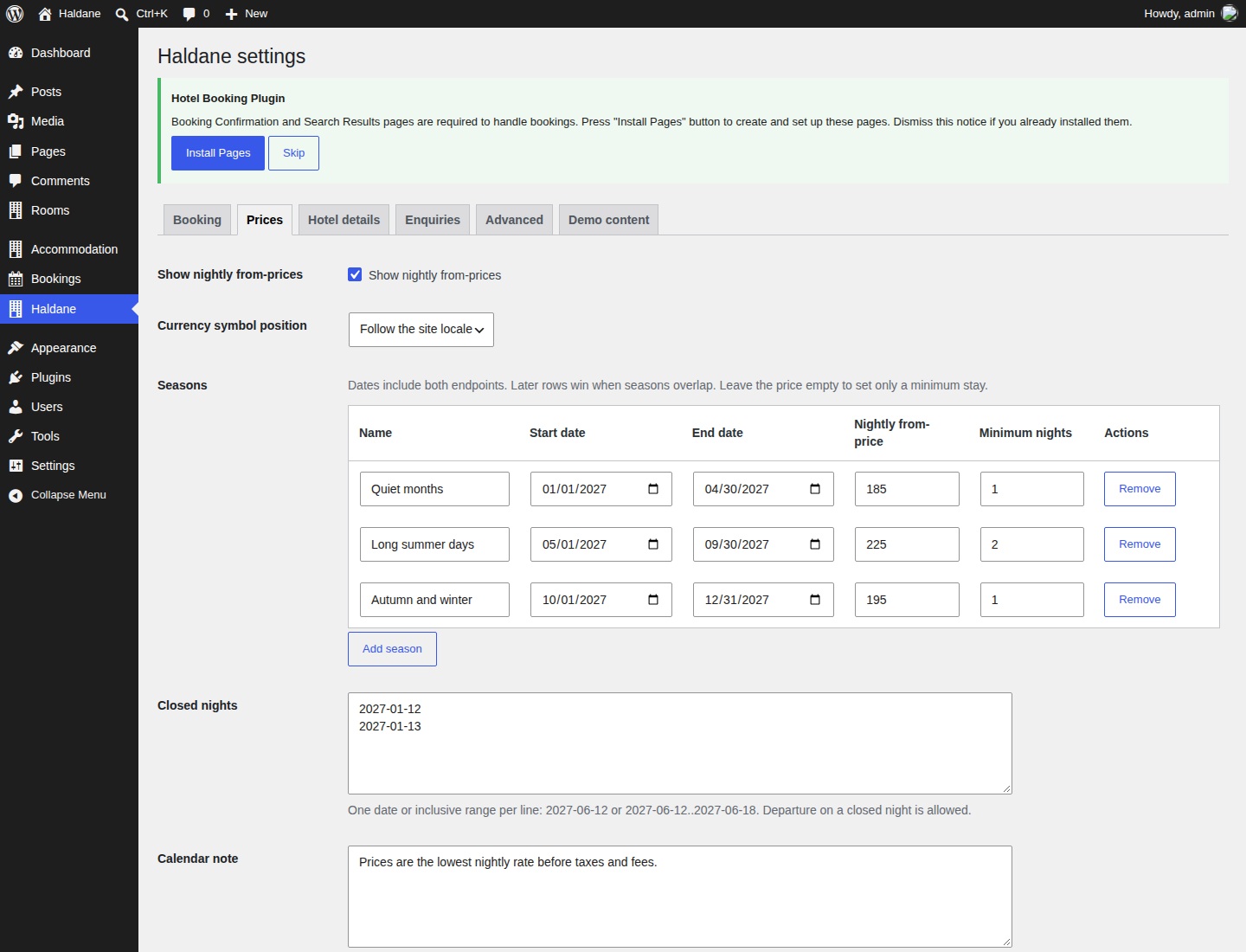
Add seasons and nightly prices
- Open Haldane → Prices.
- Enable Show nightly from-prices if you want prices inside the date picker.
- Choose a Currency symbol position. The currency itself is set in Haldane → Booking.
- Select Add season.
- Enter a name, start date, end date, nightly from-price and minimum nights.
- Add further seasons, then select Save Changes.
Start and end dates are inclusive. A season from 1 June to 30 June applies to both of those nights. Later rows override earlier rows where dates overlap. Put a short special period after a broad season if it should take precedence.
Enter a price without a symbol. Leave it empty to set only a minimum stay. An empty price in a later overlapping row also replaces the earlier price with no displayed price. Prices can have two decimal places. You can add up to 200 season rows.
How minimum nights work
A season's minimum stay applies to the arrival night. A guest arriving on a night with a three-night minimum must select at least three nights. The rule is not recalculated from every later night in the stay.
Outside a season, Default minimum nights in Haldane → Booking applies. Minimums can be from 1 to 365 nights. Hiding prices does not remove minimum-stay or closure rules.
Close nights
Enter one date or inclusive range on each line in Closed nights. Use YYYY-MM-DD. Separate the two ends of a range with two full stops:
2027-06-12
2027-07-01..2027-07-07
A guest cannot occupy or cross a closed night. Departure on a closed date is allowed because the guest does not stay that night. For example, closing 12 June allows a stay that checks out on 12 June, but prevents a stay through that night. Invalid dates are skipped with a settings message, so review the saved values.
Calendar note and booking window
Use Calendar note to explain what the displayed price includes. The default says that rates are the lowest nightly price before taxes and fees. Write wording that matches your own pricing. The note appears when nightly prices are enabled.
Days ahead bookings open in Haldane → Booking sets the number of available calendar nights starting today in the site's timezone. It defaults to 540 and accepts 1 to 1825. Departure can fall on the day after the last night.
Test an ordinary stay, a short stay during a longer minimum, a date range across a closure and departure on a closed date.
Fresh data and caching
The browser requests /wp-json/haldane/v1/calendar and uses the calendar included in the page if that request fails. The endpoint allows public caching for 900 seconds. If a price change does not appear immediately, clear the page and REST/proxy caches and try a new browser session.
Developer extension: PHP filter
A separate site plugin or add-on can replace nightly data using haldane_toolkit_calendar_data. The callback receives the calendar and booking settings. Run external requests on the server, keep credentials there and cache the result. No live-rates add-on is included.
add_filter( 'haldane_toolkit_calendar_data', function ( $calendar, $booking ) {
	$cached = get_transient( 'haldane_site_rates' );
	return is_array( $cached ) ? $cached : $calendar;
}, 10, 2 );
In this example, your integration must populate haldane_site_rates with a complete calendar in the shape below. When no cached data exists, the manual calendar remains in use. Cache keys should distinguish currencies and any other setting that affects the supplied rates.
array(
	'start'    => '2027-06-12',
	'currency' => 'USD',
	'days'     => array(
		array( 150.00, 1, 2 ),
		array( null, 0, 1 ),
		array( 175.00, 1, 1 ),
	),
)start: the first night, inY-m-dformat.currency: a three-letter uppercase currency code.days: an ordered array, one tuple per consecutive night. Index zero starts onstart.- Each tuple is
[price, open, minNights]. Price is a non-negative number ornull. Open is1or0. Minimum nights is an integer from 1 to 365.
Supply a nonempty array covering the intended booking horizon, normally beginning today in the site's timezone. Up to 1825 nights are accepted. The plugin normalises accepted data and falls back to the manual calendar for an invalid overall structure. It also uses this data when validating enquiry stays. Enable nightly from-prices in the Prices tab to show supplied prices.
Developer extension: JavaScript event
After fresh or fallback data is loaded, the booking script dispatches haldane:calendar on document. The event detail contains calendar in the same shape. The active calendar is also available at window.haldaneBooking.calendar.
document.addEventListener('haldane:calendar', function (event) {
	var output = document.querySelector('[data-hotel-currency]');
	if (output) {
		output.textContent = event.detail.calendar.currency;
	}
});
This is a notification for other scripts. Dispatching the event yourself does not replace the booking calendar. Use the PHP filter to provide data. Register your listener before the booking script finishes loading; a later script can read the current calendar from window.haldaneBooking. Enqueue scripts through WordPress rather than pasting them into a page.