Demo import
Add editable sample pages, rooms and images from the Haldane dashboard. The importer only runs when you choose content and give permission.
On this page
What it creates
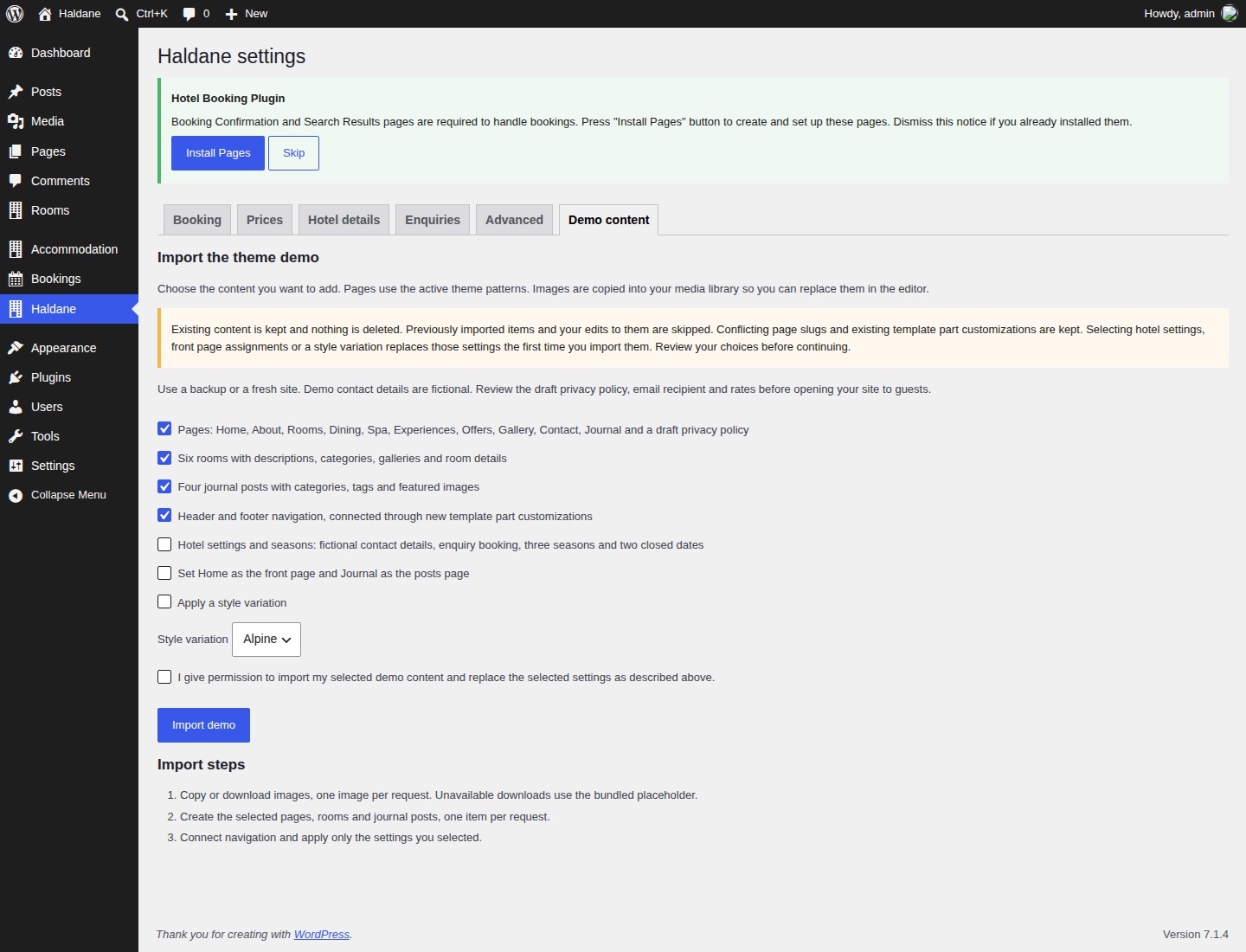
Open Haldane → Demo content with Haldane or Haldane Child active. The built-in importer offers these groups:
- Pages: Home, About, Rooms, Dining, Spa, Experiences, Offers, Gallery, Contact and Journal, plus a draft privacy policy. An existing privacy policy is kept.
- Rooms: six rooms with descriptions, room categories, details and galleries.
- Posts: four journal posts with categories, tags and featured images.
- Navigation: header and footer menus, connected through customisations of the three header and two footer parts.
- Hotel settings and seasons: fictional contact information, enquiry-only booking, three example seasons and two closed dates.
- Front page assignments: Home becomes the front page and Journal becomes the posts page.
- Style: your choice of Clay, Coast, Alpine, City, Desert or Night.
Content groups are selected initially. Hotel settings, front page assignments and style are unchecked. Selecting a variation in the list does not apply it unless you also select the style checkbox. Leave style unchecked to keep the default Haldane appearance.
The importer copies 25 bundled placeholder illustrations into the Media Library when importing pages, rooms or posts. Images in the imported blocks point to those attachments. It uses the theme's current full-page patterns and turns them into blocks you can edit. It does not need One Click Demo Import or a WXR file.
Run the import
- Use a fresh site or make a backup.
- Activate Haldane or its child theme and Haldane Toolkit.
- Open Haldane → Demo content.
- Choose the groups you want. If you already have pages, review the settings choices carefully.
- Read the warning and tick the permission checkbox.
- Select Import demo and keep the page open until it reports completion.
- Review the progress notes, then check Pages, Rooms and your public site.
Each request handles a small step. If a request fails, select Resume import to retry it. If the session expires, reload the page and start again with the groups you still need.
Run it again safely
The importer keeps previously imported items and edits to them, including items moved to the trash. Existing content with a matching slug and existing template part customisations are kept too. It deletes nothing. Running it again does not reset your edited demo pages.
Selected hotel, reading and style settings can replace your current values on their first import. Later runs keep those imported settings. A different style variation can be applied in a later run. Enquiry recipients and unrelated site settings are kept.
Import pages before importing navigation on its own. Menus link to published pages already on your site. If a page slug was already in use, check where its menu link leads. The imported Journal page has no body blocks because WordPress displays posts there once it is assigned as the posts page.
Use your own photographs
- Upload photographs you have permission to use through Media → Add New Media File.
- Open a page, select a placeholder Image, Cover or Gallery block and choose Replace.
- Select the new image, check its crop and add useful alternative text.
- Replace room featured images and each room's gallery separately.
- Save and check the page on a phone and a desktop.
The photographs shown on the live preview are for preview only and are not included. See image sizes for starting dimensions.
Optional server photo source
This is an optional developer setup before the first import. Ask your developer to add the constant below in the site's wp-config.php, before the line that ends configuration. Use a base URL you control and have permission to copy from.
define( 'HALDANE_TOOLKIT_DEMO_MEDIA_URL', 'https://example.com/hotel-demo/' );Alternatively, a small site plugin can set the source with this filter:
add_filter( 'haldane_toolkit_demo_media_url', function ( $url ) {
	return 'https://example.com/hotel-demo/';
} );
The importer requests <base>/<name>.jpg for each media name in the toolkit's demo/content.php, such as hero-coast.jpg and room-garden.jpg. Supply valid JPEG files. Each download has an eight-second timeout and a 12 MB limit. Missing or invalid files use the bundled placeholder and add a progress note.
No outside image host is contacted unless you configure this option. Existing imported attachments are reused even after the source changes. Use a fresh test site to preview a different source, or replace the images through the editor.